

Two of the most miserable things you can experience as a gamer are high ping and low FPS. What most players don't realise is that these are two completely different problems. Two tools to tackle these issues are Gearup Booster and WMaster Cleanup.
The former tackles network routing and the latter tackles system performance. Both tools promise a better gaming experience, but which one do you actually need? If you are confused between the two, you are in luck today. Because I have used and tested both of these tools, here is my honest breakdown for you.
In this article
- What is Gearup Booster? [In-Depth Review]
- What is WMaster Cleanup Game Booster? [In-Depth Review]
- Head-to-Head Comparison for Gearup Game Booster and WMaster Cleanup Game Booster
- Real-World Performance & Benchmarks [2026 Tests]:
- What Game Booster is the Best to Use?
- Gearup Booster and WMaster Cleanup Game Booster FAQs:
Part 1: What is Gearup Booster? [In-Depth Review]
URL: https://www.Gearupbooster.com
Created by a Singaporean company, Gearup Portal PTE LTD, Gearup Booster is a network optimization tool. Does Gearup Booster work for gamers? Although it does not interfere with your system performance and does not touch your hardware, it simply reduces ping, packet loss, and jitter by rerouting your game traffic through faster and more stable network paths.
AIR, Adaptive Intelligent Routing, is the main technology used by this tool. It does not send your data to whatever path your ISP defaults to. What Gearup Booster does instead is dynamically selecting lower latency routes to game servers in real-time. It is more than your average traditional VPN; you can think of it as a gaming-focused network accelerator.
Pricing: $9.99 per month. ~$60-$80/year. HYPEREV router from $39.99
How to Use Gearup Booster
Open the app, select your game, and hit Boost. Gearup Booster will automatically take care of the routing; you don't need any technical setup.
Core Features of Gearup Booster:
- UsingAIR tech for ping reduction. It goes beyond congested ISP routing for faster paths to game servers.
- Offers packet loss and jitter stabilizationthat is very useful for gamers who live in regions with unstable ISP infrastructure.
- With cross-platform support, it works on PC, Android, iOS, and even consoles with a PC gateway or HYPEREV router.
- It supports 1000+ games. CS2, Valorant, Apex, Free Fire, Fortnite, PUBG, and many more.
- Gearup optimization uses the HYPEREV gaming router hardware solution at the network level for console players, so there's no need for a PC.
Pros:
- Significantly reduces ping for gamers with poor cross-region play or ISP routing.
- Easily works on the console.
- Minimal and clean interface.
- You get a 3-day free trial before you decide to pay.
Cons:
- No native Mac client in 2026; this is its biggest gap as a globally distributed tool.
- If your base ping is already under 30ms on a strong connection, it simply won't help.
- Different pricings for identical plans in different regions.
- Payment details are required for the free trial.
Part 2: What is WMaster Cleanup Game Booster? [In-Depth Review]
WMaster Cleanup is an all-rounder PC optimizer for Windows. It offers a suite of tools, including its latest Game Booster feature, that is specifically for improving your gaming performance. Gearup Booster handles your network, but WMaster Cleanup does more than that.

It efficiently handles your system by freeing RAM, clearing background processes, cleaning game cache, and optimizing the way Windows uses resources while you play.
The Game Booster feature offers three modes: Lite, Advanced, and Esports. The Esports mode is made for heavy gaming and professional Esports enthusiasts.
It has the deepest optimization level and is designed for competitive play where every frame and even a millisecond of input lag matters.
💡For your reference: WMaster Cleanup's Game Booster pushed average FPS from 220.2 to 372.2 in real benchmark testing on Delta Force, on the same hardware.
Is low FPS affecting your gaming performance? Read our latest hands-on write-up to learn the 10 easiest proven ways to improve FPS in games in 2026.
URL: https://www.wmastercleanup.com/game-booster.html
WMaster Cleanup
What Makes WMaster Cleanup Game Booster Stand out
- ·Detects & optimizes over 5000+ games, from mainstream esports to niche indie titles.
- ·Offers 3 performance modes for casual daily play, advanced play, or pro-level esport play.
- ·Built-in safety net to restore default Windows configurations with a click.
- ·Permanently disable Windows interruptions, like Sticky Keys and OS noise.
- ·RAM optimization reduces lag, improves FPS, and enhances overall gaming performance.
Amazing Features You Get As A Part of WMaster Cleanup's Full Suite:
WMaster Cleanup is an unbeatable PC maintenance tool because it offers every feature you will ever need for an optimized PC. WMaster Cleanup includes Disk Cleanup, Clean C Drive, Duplicate File Remover, Disk Space Analyzer, Disk Defrag, Clear Cache, and Uninstall Application, along with the Game Booster feature that makes a gamer's life easier and faster.
Pros:
- Measurable FPS improvement even on lower-spec and mid-range PCs.
- Instantly minimizes screen tearing and drops network ping with a single click.
- Optimization and scanning available for more than 5,000 game titles.
- 3 different modes cover all your needs, from daily gaming to Esports.
- Offers revert configuration, which means you can safely optimize CPU and GPU.
Cons:
- No mobile or console support; works only for Windows.
- Network optimization is not a primary feature but a secondary thing, so it cannot fully replace a tool dedicated only to network optimization like Gearup Booster.
- Installation required, as well as occasional manual runs for best results.
Cleaning & optimizing your PC directly translates to higher FPS, lower input latency, and smoother gameplay. The fact that WMaster Cleanup is an all-around PC optimization tool makes it one of the best PC cleaners for Windows 10 & 11.
How to Use WMaster Cleanup Game Booster:
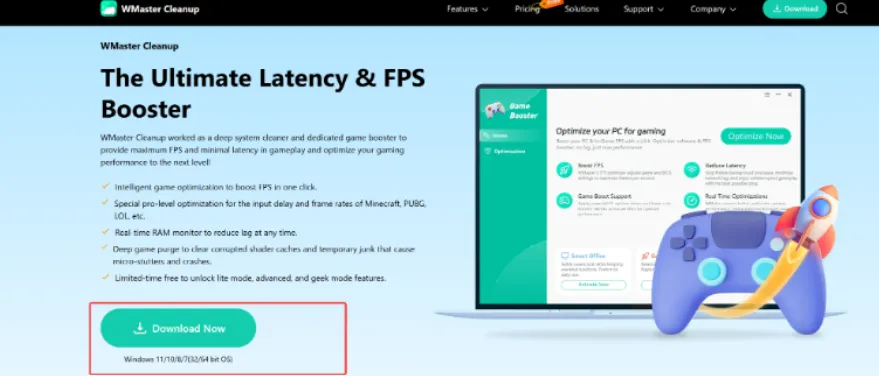
Step 1: Head over to the official page of WMaster Cleanup, point your cursor to the Feature tab, and click Game Booster. Now, hit Download Now and complete the installation process.
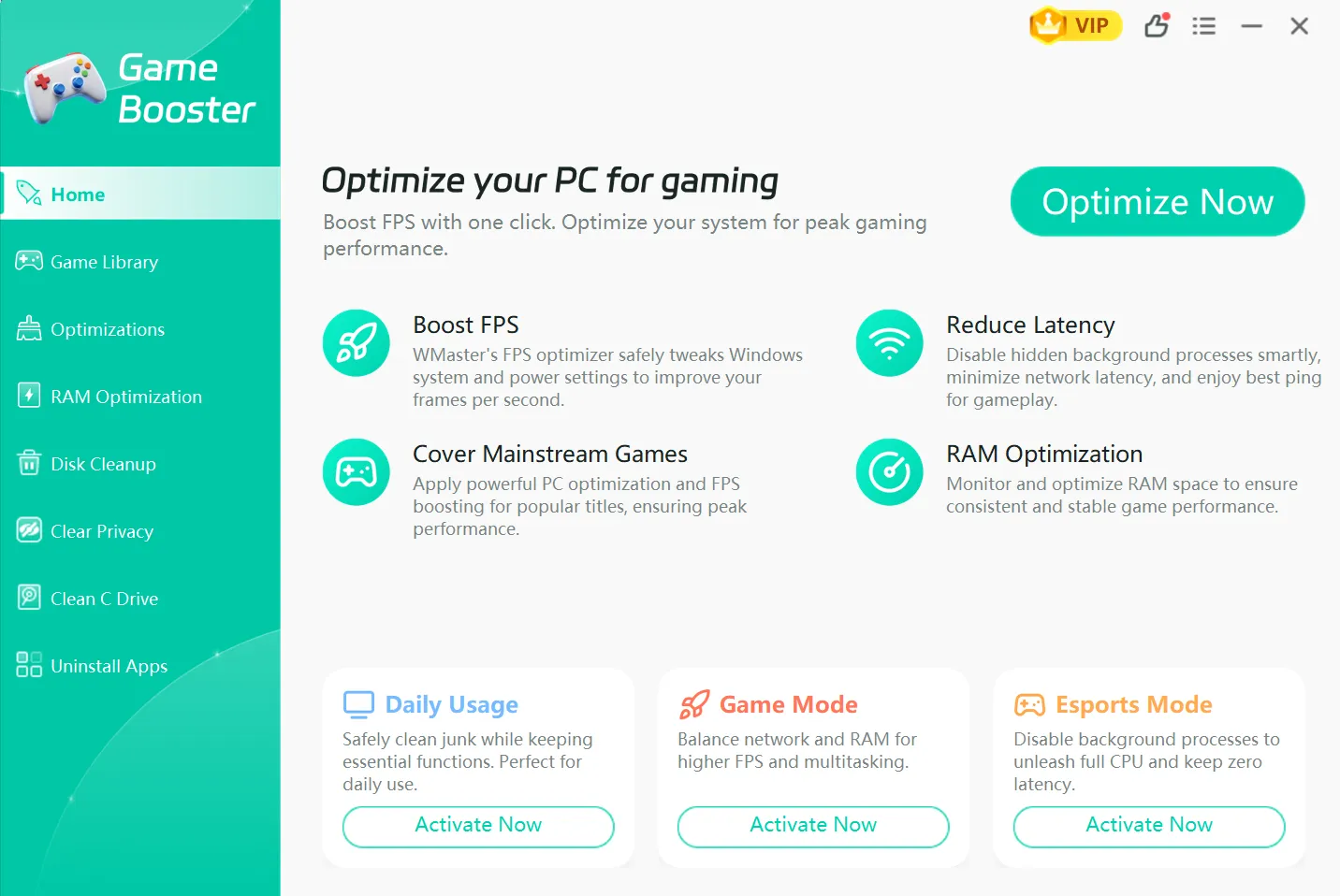
Step 2: Once done, start the software to directly land on the Game Booster main interface.
Step 2: Click on the Optimizations tab and select the Esports mode. Now, from the "All" tab, select the optimization options that apply to your setup.
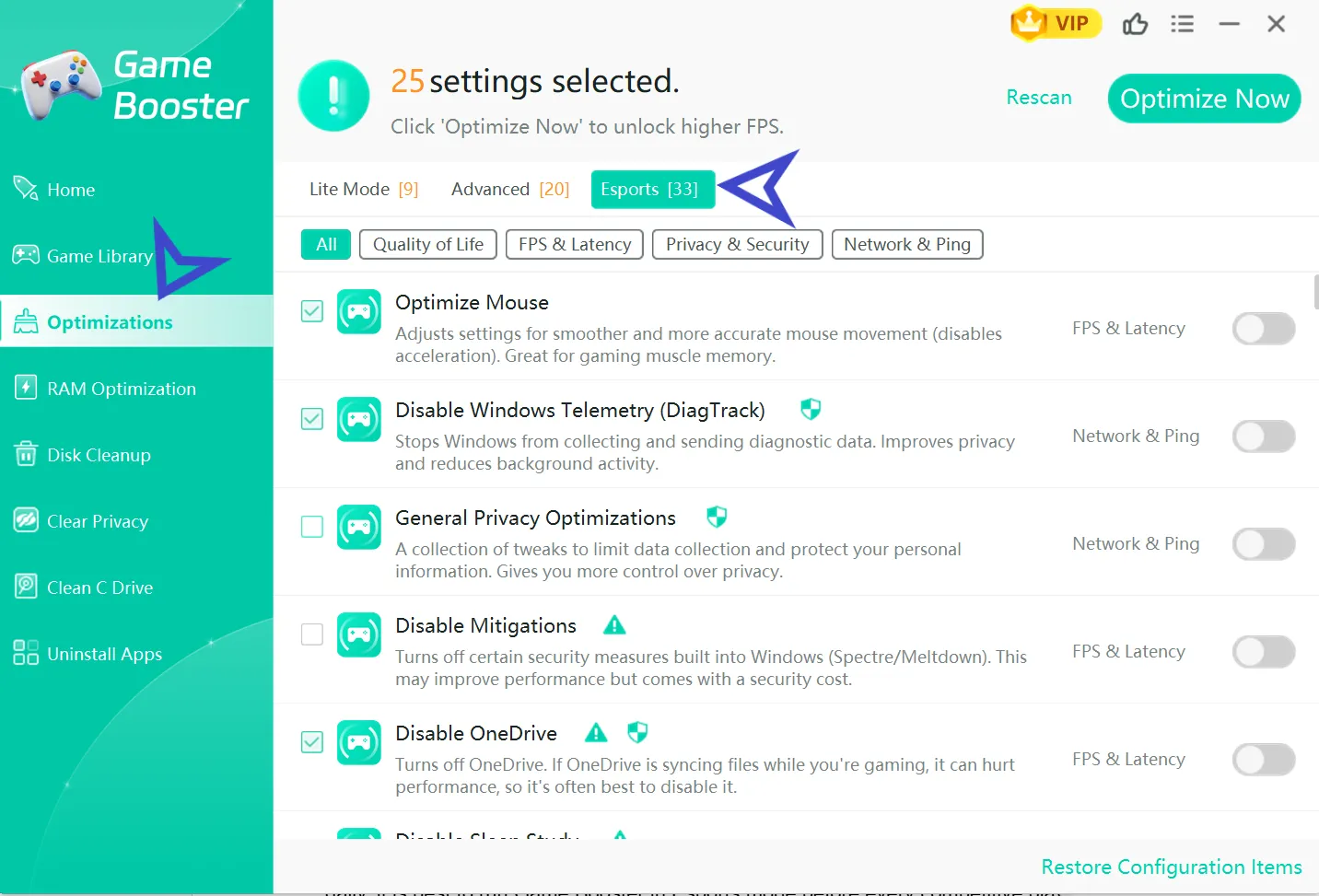
Step 3: Click the Optimize Now button and Restart your PC to have an amazingly improved gaming session next time you play.
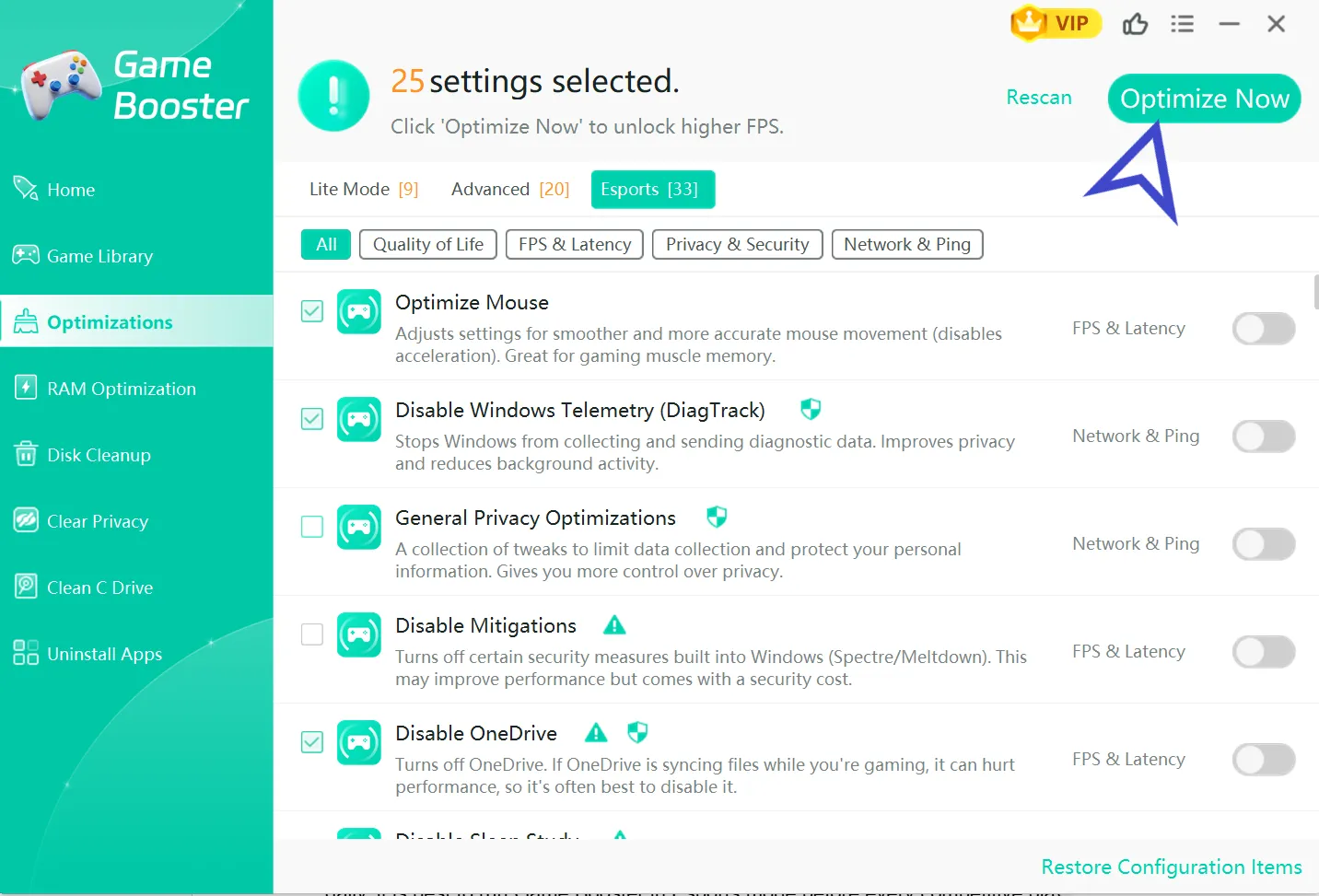
💡Insider Tip: Even after a reboot, the cache builds again; Windows keeps running update tasks and services in the background. So, it is best to run Game Booster in Esports mode before every competitive play session. It will just take a few seconds, but the improved FPS will be worth more than that.
Part 3: Head-to-Head Comparison for Gearup Game Booster & WMaster Cleanup Game Booster
| Feature | Gearup Booster | WMaster Cleanup Game Booster |
|---|---|---|
| Ping Reduction | Core feature (AIR technology) | Core feature, more comprehensive than Gearup Booster in real-life testing (Dedicated tab to optimize Network & Ping) |
| FPS Boost & Stutters | Not the main purpose | Core feature and significantly improved results (Dedicated tab to optimize FPS & Latency) |
| Lag Reduction | No | Core feature |
| RAM Optimization | No | RAM accelerator |
| Game Titles Support | 3000+ | 5000+ |
| Configuration Restore | No | Supported |
| Clean Junk Files | No | Full disk cleanup suite |
| UI | Minimal, one-tap | Sleek & clean dashboard; Super easy for both beginners and techies |
| Ease of Use | Very easy | Simple & intuitive |
| Platform | PC, Mobile, Console | Windows 7, 8, 10, 11 |
| Customer Support | Live chat + email | Email support and table list support |
| Price | $9.99/month | Free for a limited time |
| Real-World Benchmarks | 15%–40% ping reduction (variable) | FPS: 220 → 372 (Delta Force test) |
| Safety/Privacy | Singapore-based, reputable | Windows-native, no data collection |
Part 4: Real-World Performance & Benchmarks [2026 Tests]:
Ping/Latency Tests:
When the issues you are facing are related to ISP routing, then Gearup Game Booster'works best.
I also experienced significant and measurable ping drops in Warzone and competitive titles when using standard ISP routing on Brazilian servers with 800 Mbps fiber. Those with existing sub-30ms connections to nearby servers didn't see much of a benefit.
My recommendation is that this tool is most useful to players who are in regions with poor ISP infrastructure or who are connecting across regions.
FPS & Frame Time Stability:
WMaster Cleanup is a game booster that provides a stable FPS boost on both low-end and high-end PCs. After I used Game Booster and optimized, the average FPS increased from 220.2 to 372.2 in Delta Force.
Fewer random dips in the middle of a fight were noticed in CS2 and Free Fire. Gearup has no significant effect on FPS or frame time because it doesn't affect system resources.
Keep in mind that raw FPS numbers do not actually give you the complete picture. Inconsistency in frame times can make your game feel stuttery even on 144 average FPS, because some frames take 3ms while others might take 15ms, and this inconsistency is exactly what gives a hitchy feeling when you play.
I tested WMaster Cleanup's optimization on CS2, and it significantly smoothed out frame time variance. Not only did the average FPS go up, but the game also visibly felt smoother frame to frame. That is why I recommend WMaster Cleanup's Game Booster because it does not just boost numbers; it is a tool that actually improves your playability.
Low-End vs High-End PC Results:
The effect is more pronounced on lower-end machines, as the background processes consume a higher percentage of the available resources, and removing them leaves a larger percentage of resources for the game.
On higher-end rigs, the FPS improvements are less, but frame time stability and input lag improvements are still noticeable. Gearup results are not significantly different based on PC specs. Network routing optimization is independent of hardware.
Check out our simple guide on 7 Ways to lower ping and reduce network delay. In this write-up, you will also find how WMaster Cleanup, a one-click optimizer, can eliminate lag during your games and improve your playability.
Part 5:What Game Booster is the Best to Use?
Choose Gearup Booster if:
- You have a high or fluctuating ping.
- You are playing on a cross-region server or on servers that are far away from you.
- You are on console (PS5, Xbox) and require a network-level solution
- You compete against other players on your mobile device.
Choose WMaster Cleanup Game Booster if:
- You're experiencing a drop in FPS while playing or stuttering.
- Your computer is lagging before or while playing games.
- You wish to have a complete PC maintenance program along with game optimization
- You are running Windows and are looking for a system-level enhancement.
Can You Use Both? Yes, they are complementary, not competitive!
Gearup fixes your connection to the game server. WMaster Cleanup optimizes your PC for the game locally.
Running both means your traffic runs fastest AND your system uses the most resources to run it. I would say this is a must-have for any Esports level PC player; if one task cannot be done by one tool, it is easily covered by the second tool.
Part 6: Gearup Booster and WMaster Cleanup Game Booster FAQs
Q1.Is Gear up Booster legit?
Gearup Booster is legitimate. It's developed by Gearup Portal PTE. Singapore-based LTD, which has official partnerships with PUBG, Marvel Rivals, and other big titles. It performs as expected for network routing, but the outcome is very much dependent on the quality of your base network connection.
Q2. Does WMaster Cleanup Game Booster reduce input lag?
Yes, it significantly reduces input lag. WMaster Esports mode clears out the background tasks that cause a delay between your mouse click and what actually happens on the screen. With all background processes cleared, your hardware responds faster to your inputs.
Q3. Is WMaster Cleanup's Game Booster safe to use?
Absolutely! This tool only stops non-essential background processes and clears the cache, making it completely safe to use. WMaster Cleanup Game Booster does not touch drivers, registry settings, and system files in a way that can destabilize Windows in even the slightest of ways. And in case something feels off to you after optimization, using the Configuration Restore feature, you can simply roll back to your previous settings.
Q4. Can I use WMaster Cleanup Game Booster on my console or mobile?
You cannot use WMaster Cleanup on these devices; it is for Windows 7, 8, 10, and 11. Gearup Booster can be used with Android, iOS, and consoles through its HYPEREV router.
Q5. Are regular VPN and Gearup Booster the same?
Both are two different things; VPN encrypts traffic for privacy, but may introduce latency. Gearup doesn't encrypt; it purely optimizes routing for speed and stability. The aim is not anonymity but rather reduced ping.
Conclusion:
Game Booster and Gearup Booster work amazingly well for different things gamers want. Gearup Booster minimizes ping by optimizing the way your data gets to the server. And WMaster Cleanup improves FPS by optimizing your PC's performance with the game. Neither one is a substitute for the other.
You should use Gearup Booster when you're having a problem with ping, especially if you're on console or playing cross-region. When FPS drops and stutters take the toll on your performance, WMaster Cleanup has the game booster and complete PC optimization suite to take care of that. Both are required, and you have all angles covered.