


If you've been a CCleaner user for a long time and are now looking for a reliable alternative, you're not alone. Though it has served users pretty well for the past few years, they are now more aware than ever of their privacy and want a alternative for CCleaner that respects it.
Users want a tool with a modern system architecture and without pop-ups. I have personally tested many clearing tools on Windows 11 over the past few months. Some of them were up to the mark, while others completely missed the mark.
Keeping all my research in mind, I have put together the 10 best CCleaner alternatives for 2026 for you. So, keep reading for some cool alternatives to ccleaner we recommend.
In this article
- Why Are People Looking for an Alternative to CCleaner?
- Criteria to Find the Best ccleaner alternative
- Best Alternative to CCleaner for Windows 11 — WMaster Cleanup [Editor's Choice]
- Other 9 Ccleaner Alternatives You Can Consider
- CCleaner vs CCleaner Alternatives — Comparison Table
- Tips to Safely Switch From CCleaner to a New Cleaner
- Real-World Results — How Much Space Can You Actually Free?
- FAQs About CCleaner Alternatives
Part 1: Why Are People Looking for an Alternative to CCleaner?
A lot of people have started leaving CCleaner and switching to other alternatives because it's harder to trust and use. Here is a breakdown of all the reasons why people are looking for an alternative to ccleaner.
1: Privacy and Telemetry Concerns
- Data collection you didn't sign up for: When Avast bought CCleaner back in 2017, users couldn't help but notice background data activity. Even Avast was caught selling browsing data to a company named Jumpshot in 2020. Though it eventually shut down, users still failed to trust CCleaner again.
- Background monitoring is on by default:The Active Monitoring feature is enabled in CCleaner, and users have to dig deep into the settings to turn it off, which is a big turn-off.
- Unclear privacy guidelines: With CCleaner, you are unsure what data the tool collects, which affects user privacy.
2: Bundled Offers, Ads, and UI Clutter
- You open it to clean, not to shop: But CCleaner's free version greets you with upgrade prompts for Pro, Browser, and Driver Updater every single time.
- Extra software shows up without warning: Miss one checkbox during install, and something you didn't want is already on your PC.
- Health Check alerts are not real warnings: They're designed to look urgent so you buy Pro. Nothing more.
3: Windows 11 Changes and Why Older Cleaners Feel Outdated
- Windows 11 comes with its own cleaning tools: Storage Sense and Disk Cleanup are already built in. CCleaner adds little on top and occasionally conflicts with them.
- Microsoft itself says registry cleaning doesn't work: It won't speed up your PC and can actually cause issues. CCleaner still leads with it as a feature.
- CCleaner was built for a different era: It doesn't recognize how Windows 11 stores app data, so it regularly skips junk that newer apps leave behind.
Part 2: Criteria to Find the Best CCleaner Alternative
- No data collection or telemetry: your cleaning tool shouldn't be reporting your activity anywhere.
- Duplicate file detection: CCleaner doesn't have this; it's one of the biggest storage savers on any PC.
- Full app uninstallation with leftover removal: not just the app, but every file and folder it leaves behind.
- Multi-browser cache clearing in one pass: CCleaner's browser cleaning is inconsistent across newer browsers.
- Visual disk space analyzer: shows exactly what's eating your storage, not just what's safe to delete.
- Windows 11 native support: built for how Windows 11 actually stores and manages files, not patched for it.
- Clean install with no bundled software: no checkboxes to uncheck, no extra tools you didn't ask for.
Part 3: Best Alternative to CCleaner for Windows 11-WMaster Cleanup [Editor's Choice]
WMaster Cleanup is my top pick for a CCleaner alternative. Some of the things I love about this tool include no ads, extreme respect for user privacy, and no data collection. In addition to doing everything you get in CCleaner, it offers a lot more.
Duplicate file remover, uninstall application, cache cleaner, and visual disk analysis are some of the top features you can enjoy on this tool. Furthermore, WMaster Cleanup doesn't prompt you to upgrade to its Pro version every few minutes.
Website: https://www.wmastercleanup.com
Price: Free for a limited time
Platform: Windows 7/8/10/11
WMaster Cleanup
5 Core Features of WMaster Cleanup That Surpass CCleaner
- ·Clean design and simple, intuitive interface make optimization easier.
- ·No annoying ad pop-ups to interrupt you, offering smooth, distraction-free performance.
- ·Clear privacy policy with high transparency, showing you what's being cleaned.
- ·Provide advanced features in one tool that most cleaning tools are hard to achieve.
- ·Clear browser caches,and remove duplicate files in bulk with one click.

How to Switch from CCleaner to WMaster Cleanup?
If you have never used any other cleaner but CCleaner and are worried about how to make the switch, we have you covered.
Following are all the steps you need to follow for this switch.
Step 1: Remove CCleaner From Your Windows PCFirstly, remove CCleaner from your device before installing WMaster Cleanup or any other new cleaner on your Windows PC. For this:
Go to Windows Settings- Apps- Installed Apps.Find CCleaner and click Uninstall.
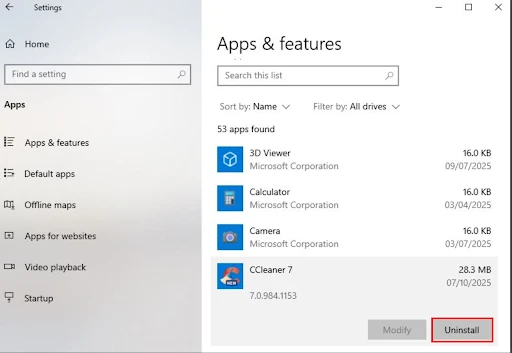
💡Tips:Uninstall any Avast tools or CCleaner Browser from your device if they are present.
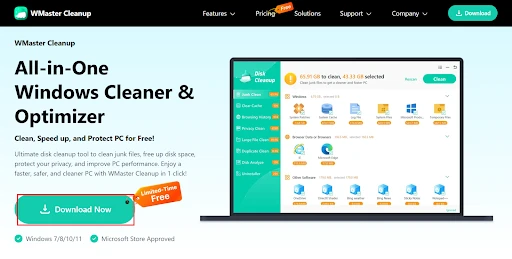
Step 2: Download and Install WMaster Cleanup on Your Windows PCHead to WMaster Cleanup official website and click Download Now -a best Ccleaner alternative.Once downloaded, install the app on your Windows PC.
Once the installation completes, open WMaster Cleanup on your device. Select Disk Cleanup, then click Scan Now to initiate the process.
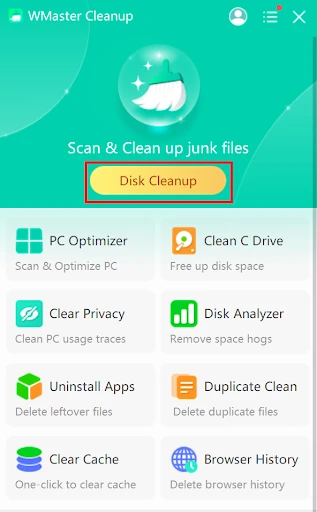
Once the scan completes, look through everything it has found and uncheck anything you don't want to remove, and select Clean to remove the rest.
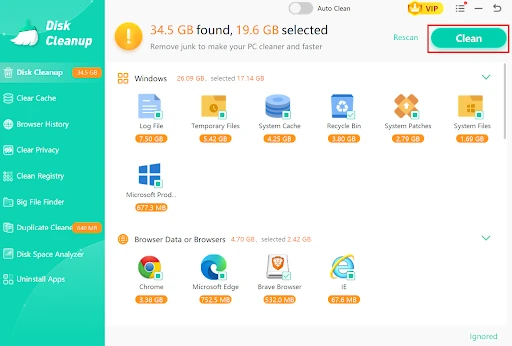
Although WMaster Cleanup is an all-in-one cleanup tool that automates system cleanup, you can also read our beginner-friendly writeup to learn how to clean your Windows manually without downloading any third-party software.
Part 4: Other 9 CCleaner Alternatives You Can Consider
1.BleachBit-Free and Fully Open-Source
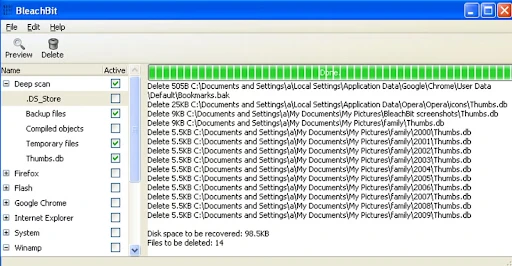
BleachBit is an open-source, this free alternative to CCleaner is designed for users who are especially careful about their privacy. This tool offers full transparency and allows anyone to read the code. Additionally, you won't find any telemetry, ads, or tracking of any kind on this tool.
URL: https://www.bleachbit.org
Price: Completely free
Pros:
- Completely open-source
- No data collection
- Zero ads
Cons:
- Outdated interface
- No duplicate file finder
- Lacks a visual disk analyzer
Best For: Developers, IT pros, and privacy-focused users
Trustpilot Rating: 3.2 / 5.0
2.Wise Disk Cleaner -Simple and Lightweight
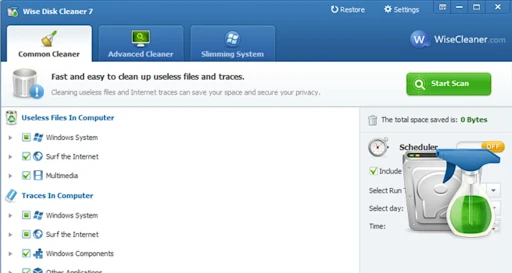
Wise Disk Cleaner has been serving users for over a decade. It is a fast, easy-to-use tool that lets you handle basic junk removal. You even get a simple disk defragmenter in this tool. If you don't want any complexity and just need a junk cleaner, this is the right pick.
URL: https://www.wisecleaner.com/wise-disk-cleaner.html
Price: Free (Pro version available)
Pros:
- Lightweight and simple
- Easy interface; ideal for beginners
- Includes a basic defragmenter
Cons:
- Lacks duplicate file detector
- No deep cleaning
- Can show upsell prompts at times
Best For: Casual users who want a simple, no-fuss cleaner.
Trustpilot Rating: 4.7 / 5.0
3. Glary Utilities- A Full Toolkit in One App
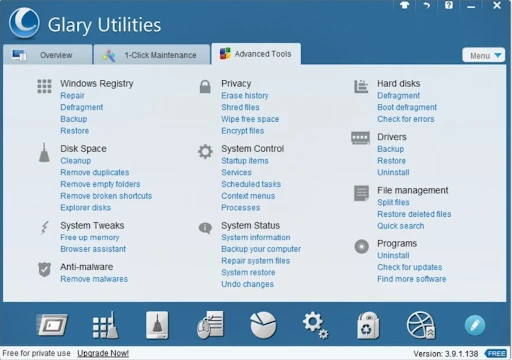
Glary Utilities is one such CCleaner alternative, a collection of 25 tools in one app. It includes everything from a startup manager to a memory optimizer, disk cleaner, file shredder, and much more. This tool is the most feature-packed among all the free options listed here for you.
URL: https://www.glarysoft.com
Price: Free; Pro at $19.97/year
Pros:
- Multiple tools available
- Includes a duplicate file finder
- One-click maintenance mode
Cons:
- Multiple options can feel overwhelming
- Some tools don't work well on Windows 11
- The interface is a bit cluttered
Best For: Power users and tech enthusiasts
Trustpilot Rating: 3.6 / 5.0
4. Avast Cleanup Premium - Polished but Pricey
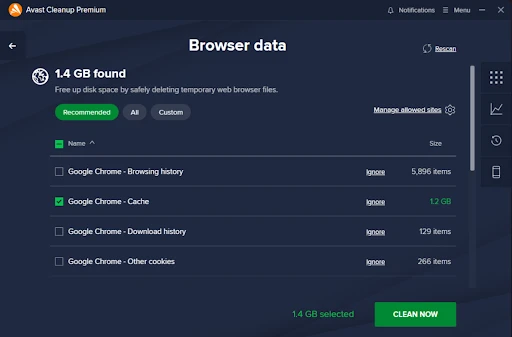
Avast Cleanup Premium is another excellent Ccleaner alternative, offering multiple features that make it the right pick. This tool offers automatic cleaning and a sleep mode for background apps.
You also get bloatware detection in this tool. However, if privacy is your biggest concern, you can skip this one, as they were caught selling user data back in 2020.
URL: https://www.avast.com/cleanup
Price: $29.99/year (no real free version)
Pros:
- Clean and simple tool
- Easy-to-use interface
- Automatic maintenance
Cons:
- Not great with privacy
- Doesn't have a free version
- Heavier on system resources
Best For: Users who want an automated experience
Trustpilot Rating: 4 .3 / 5.0
5.Iolo System Mechanic- For Older PCs That Need a Boost
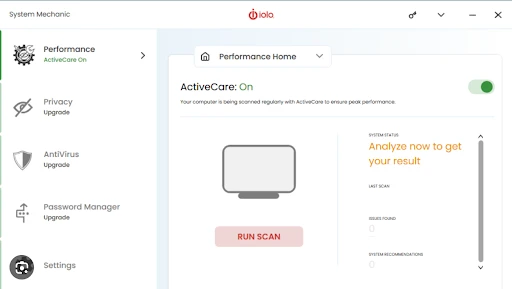
This is another great Ccleaner alternative, focused on performance tuning. Some of the features this tool offers include startup speed, internet settings, RAM management, etc. More than a junk cleaner, this tool works as a performance optimizer. Unlike other CCleaner alternatives listed here, this one works well on older machines.
URL: https://www.iolo.com/products/system-mechanic
Price: $39.95/year
Pros:
- Works as a performance optimizer
- Provides live system monitoring
- Offers regular Windows compatibility updates
Cons:
- Relatively expensive compared to other alternatives
- Limited free trial
- Performance features are not up to the mark
Best For: Users on older Windows 11 machines
Trustpilot Rating: 4.0 / 5.0
6.PrivaZer- Built for Privacy Above Everything Else
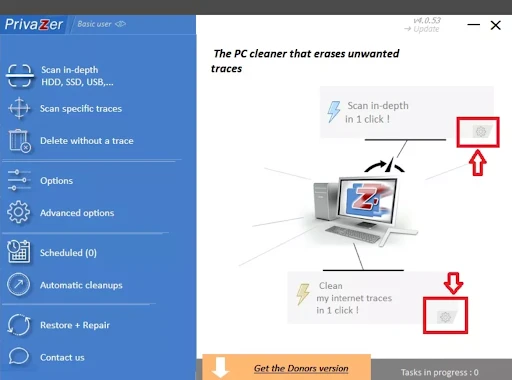
As the name suggests, PrivaZer takes your privacy too seriously. This tool is specifically designed to clear your Windows PC of all digital traces. This cleaner goes a step beyond usual cleaners. Privacy researchers and journalists even recommend this tool.
URL: https://privazer.com
Price: Free (Donor's version with extra options)
Pros:
- Takes your privacy seriously
- No installation needed
- No ads and telemetry
Cons:
- The interface is a little complicated
- Scans take longer than other apps
- More focused on privacy than cleaning
Best For: Privacy-focused users, journalists, legal professionals
Trustpilot Rating: 4.3 / 5.0
7. Auslogics BoostSpeed - Good for First-Time Users
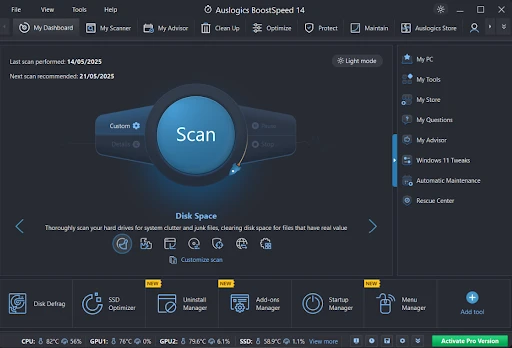
This CCleaner alternative pairs disk cleaning with other features, such as internet optimization and privacy erasure. If this is your first time trying junk cleaning apps, this is the right app to start with.
The interface of this cleaner is the friendliest, and you are guided throughout the cleaning process. Moreover, this tool includes a browser cache cleaner and a disk defragmenter.
URL: https://www.auslogics.com/en/software/boost-speed
Price: Free trial; Pro at $29.95/year
Pros:
- Beginner-friendly
- Excellent customer support
- Features a disk defragmenter and browser cleaner
Cons:
- Most features are locked behind the paid version
- Free version has limited features
- Registry cleaning doesn't work well on Windows 11
Best For: First-time PC cleaner users.
Trustpilot Rating: 4.1 / 5.0
8. Revo Uninstaller - The Best Tool for Removing Apps Completely
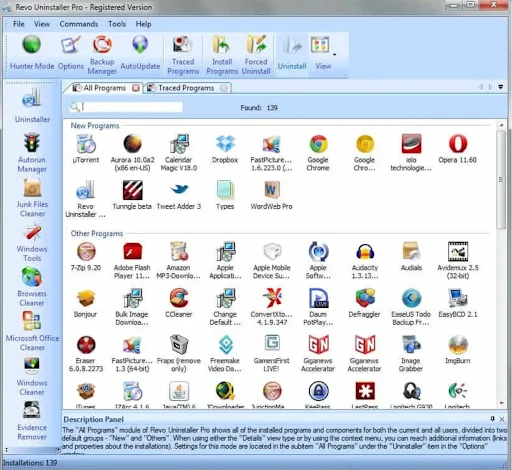
Revo Uninstaller, though, is not an all-in-one cleaning app; it does what it's meant to do really well. The only thing this tool claims to do and is excellent at is removing software completely. Generally, when you uninstall software from Windows, it leaves behind files and folders. Using this tool, you won't have to worry about leftover files and folders.
URL: https://www.revouninstaller.com
Price: Free; Pro at $19.95/year
Pros:
- Removes software completely
- Force-remove software
- Startup manager in the free version
Cons:
- Not a cleaning tool typically
- Needs to be paired with another tool for cleaning
- Basic interface
Best For: Users who want to remove old apps cleanly
Trustpilot Rating: 4.4 / 5.0
9. TreeSize Free - Find What's Eating Your Storage
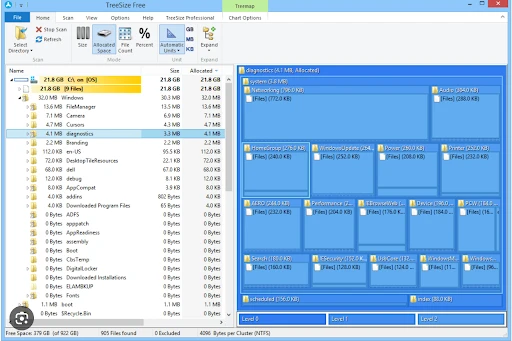
TreeSize Free is different from all the other CCleaner alternative tools you find out there. Though it doesn't typically clean your PC, it helps you track what's eating all your device's storage. This tool maps your entire drive by folder size and breaks it down into subfolders, all with a visual tree layout. For deep cleaning, you can use it with another cleaning tool.
URL: https://www.jam-software.com/treesize_free
Price: Free (Professional version available)
Pros:
- Features a free disk analyzer
- Scan happens fast
- No installation needed
Cons:
- Can't clean anything on its own
- Needs pairing with a cleaning tool
- Outdated interface
Best For: Technical users and IT professionals
Trustpilot Rating: 4.7 / 5.0
Part 5: CCleaner vs CCleaner Alternatives-Comparison Table
| Tool | Junk Cleaning Depth | Windows 11 Ready | Contains Ads | Privacy Transparency | Free Version | Interface |
|---|---|---|---|---|---|---|
| CCleaner | Medium | Yes | No | Low | Very limited | Cluttered |
| WMaster Cleanup | Deep | Yes | No | High | limited-time free | Clean,Modern |
| BleachBit | Deep | Yes | Minimal | High | Full Free | Basic, dated |
| Wise DiskCleaner | Shallow | Yes | Minimal | Medium | Functional | Simple |
| Glary Utilities | Medium | Yes | Moderate | Medium | Feature-rich | Dense |
| Avast Cleanup | Deep | Yes | Moderate | Low | None | Polished |
| System Mechanic | Medium | Yes | Moderate | Medium | Trial only | Dashboard |
| PrivaZer | Very Deep | Yes | No | Very High | Fully free | Technical |
| Auslogics BoostSpeed | Medium | Yes | Minimal | Medium | Trial only | Guided |
| Revo Uninstaller | N/A | Yes | No | High | Functional | Plain |
| TreeSize | N/A | Yes | No | High | Fully free | Visual |
Part 6: Tips to Safely Switch from CCleaner to a New Cleaner
- Always uninstall CCleaner completely before switching to a new cleaner.
- Create a restore point before running any new cleaner on your Windows PC.
- Before you hit "clean," cross-check and review what the tool found first.
- Start fresh with new settings in your new tool.
- Cleaning your PC once a week is more than enough.
Part 7: Real-World Results-How Much Space Can You Actually Free?
Test Setup
Here's the PC setup I use for testing the tools. It was a typical everyday-use Windows 11 PC.
OS: Windows 11 Home, Version 23H2 (fully updated)
Processor: Intel Core i5-12400
RAM: 16GB
Storage: 500GB NVMe SSD
Usage: Web browsing, documents, video streaming, light photo work
Time since last cleanup: About 8 months
Before and After
Disk Space Recovered:
| Tool | Space Recovered | Scan Time |
|---|---|---|
| CCleaner | 6.1GB | 41 seconds |
| WMaster Cleanup | 18.4GB | 67 seconds |
Between the two tools, WMaster Cleanup recovered more, as it scans multiple files, including browser cache data across multiple browsers, app log files, update caches, etc. CCleaner missed most of these files.
Boot Time (Average of 5 restarts):
| When Measured | Average Boot Time |
|---|---|
| Before any cleanup | 38.2 seconds |
| After CCleaner cleanup | 36.9 seconds |
| After WMaster Cleanup | 33.1 seconds |
What These Numbers Actually Mean
Recovering 15-20 GB of storage on a 500 GB SSD is quite useful, especially when you need space. Additionally, the boot improvement time of around 5 seconds is also real but modest. However, you can't expect a cleaning tool to increase your PC's speed.
The real differentiators here are duplicate file removal and browser cache removal. These two things, together, make WMaster Cleanup a better pick than CCleaner.
Part 8: FAQs About CCleaner Alternatives
Q1: Which tool is better than CCleaner in 2026?
Wmaster Cleanup is one such tool that is better than CCleaner in 2026. In addition to providing everything CCleaner doesn't, it also offers advanced tools like PC optimizer, Cache cleaner, and Disk analyzer, and it has no ad pop-ups whatsoever.
Q2: Does Windows 11 already have built-in cleaning tools? Do I need a third-party app?
Yes, Windows 11 includes Storage Sense and a basic disk cleanup tool, but neither fully cleans the device. They can't find duplicate files, remove browser cache files, and don't even show you where all your PC's storage is going. For this, you need third-party cleaning apps like WMaster Cleanup.
Q3: Can cleaning tools break my Windows 11 installation?
No, if you use cleaning tools that don't have hidden cache and feature high built-in quality, you won't have to worry about your Windows 11. But to be sure, review everything the tool has suggested before confirming.
Q4: How often should I clean my PC?
For heavy users, running a PC cleaner is generally recommended once every two weeks. Once or twice a month, however, is a good time for casual users who mostly use their PC for browsing and streaming only. It's also a good habit to perform a PC cleanup before any major Windows update, software switch, or large file sync.
Q5: What is the safest free PC cleaner?
The safest free PC cleaner in 2026 that takes user privacy seriously, offers a deep cleaning feature, and features an intuitive interface is WMaster Cleanup. BleachBit and Wise Disk Cleaner are some other PC cleaners to try.
Final Thoughts
Every tool we have listed in this article performs its function to some extent, but the best choice for you depends on your specific needs.
If you want a cleaning tool that handles everything in one place, including duplicate file removal, browser cache, app removal, etc., and doesn't show any ads and is free of privacy concerns, WMaster Cleanup is the right pick for you. It is ideal for beginners and experts alike, and it does the job well.
For users looking for open-source transparency, BleachBit is the perfect tool. Revo Uninstaller is second to none when it comes to app removal. But WMaster Cleanup tops the list if you want a one-size-fits-all tool.


