

Managing a device's storage is one of the common pain points of many PC users. As time passes, duplicate files, like documents, videos, photos, and music, mount up silently, and as a result, they take up valuable device space and slow down system performance. If you manually locate and delete these duplicate files, you may spend a lot of time and also put your important data at risk. In this write-up, we will compare two effective duplicate cleaner software programs for Windows to free up device space and improve PC performance!
Fortunately, there are many dedicated duplicate cleanup software programs that can automatically find and delete duplicates in a safe and effective manner. But to choose the right one, we are here to help. This article explores two widely used tools, Duplicate Cleaner and WMaster Cleanup, which help you optimize your Windows system by clearing up redundant data and removing junk files.
In this article
- Why You Need a Dedicated Duplicate Cleaner
- Advantages of Using Third-Party Duplicate Cleaner Tools
- What Is the Best Duplicate Cleaner?
- Duplicate Cleaner Pro Review in 2026
- Best Duplicate Cleaner Pro Alternative—WMaster Cleanup Review
- Duplicate Cleaner Pro VS WMaster Cleanup
- Hot FAQs Related to Duplicate Cleaner Software
Part 1: Why You Need a Dedicated Duplicate Cleaner
It may seem a simple and easy way to free up some space if you manually locate and delete duplicate files, but this method comes with several risks. To prevent these potential risks, a dedicate duplicate cleaner comes in handy. Following are the possible reasons why you need a dedicated duplicate cleaner:
- Prevent Data Loss: If you use a dedicated tool, you can get your files that were deleted unintentionally.
- Time Saving Processing: If your system has extensive media libraries, a dedicated duplicate cleaner can help you clean it within few seconds.
- Satisfactory Cleanup: Several duplicates that may be hidden in different folders go unnoticed-a dedicated tool can detect and remove them efficiently.
- Reliable Results: Humans make mistakes, whereas a dedicated tool can detect duplicates efficiently from evry corner of your computer and remove them.
- System Stability: A dedicated duplicate cleaner saves you from system errors or crashes that may cause due to manual deletion of critical system or application files.
Part 2: Advantages of Using Third-Party Duplicate Cleaner Tools
If you use dedicated software to delete duplicate files, it may offer you numerous benefits:
- Detect by File Content: Dedicated tools not only detect filenames but also accurately recognize duplicate files' content.
- Preview before Deletion Process: Using a dedicated tool helps you prevent accidental deletion by showing visual or textual previews.
- Custom Deletion Option: These specialized tools let you choose which duplicate files you want to delete by organizing them by size, date, or location.
- Time-Saving Efficacy: A dedicated duplicate cleaner will automatically deep scan your duplicate files within seconds, saving hours if you do it manually.
- Safety of Critical Data: A reliable duplicate cleaner app offers backup and restoring options, which will safeguard you if you make an accidental deletion.
- Handle Multiple File Types: A dedicated duplicate file cleaner handles multiple formats, like images, videos, music, documents, archives, and more.
Part 3: What Is the Best Duplicate Cleaner?
Are you fed up with all those duplicate files that are cluttering up your system and slowing it down? I have got the solution! After testing and comparing some of the best tools, I have compiled the top 10 standards to choose the best tool that will help you reclaim device storage space and elevate the system's performance.
- The duplicate cleaner app should deeply and accurately scan the file's content and recognize true duplicates even if they have different filenames or formats.
- Duplicate cleaner software should be compatible with different file formats of images, videos, audios, documents, and archives.
- The interface of the best duplicate cleaner software should be user-friendly and intuitive.
- It should have a preview feature so that users can view duplicates before deleting them to prevent mistakes.
- The best duplicate cleaner app must have a batch processing feature to delete multiple duplicates at once.
- Duplicate cleaner software should efficiently and quickly scan duplicate files without using excessive system resources.
- Duplicate file cleaners should have customizable filter options so that users can filter duplicate files by their size, date, or location.
- Adding backup and restoring options enhances safety-making the duplicate cleaner and more reliable.
- The best duplicate cleaner should be affordable to buy or free with core features and affordable upgrades.
- There should be regular app updates with reliable and responsive customer support.
Part 4: Duplicate Cleaner Pro Review in 2026
What is Duplicate Cleaner Pro?
Duplicate Cleaner Pro 5 is a professional-grade tool designed to free up device storage space by using content-based analysis. It is praised because of its deep scanning for duplicate files and their removal features. Its advanced algorithm can search on local and external drives, network shares, and even cloud storage for exact and comparable files. Similarly, it supports a wide range of file types-images, music, videos, and documents. Other than that, it has advanced filtering options that make it a good fit for both casual users and IT experts.
Pros and Cons of Duplicate Cleaner Pro
Pros:
- Innovative Deep Scan: Duplicate Cleaner can detect exact and comparable duplicate files using content-based analysis.
- Customizable Search Standards: Users can filter search results that are based on similarity, size, date, or location.
- Automatic Cleanup Feature: Users can use the automated routine feature and schedule scans to clean up their PC.
Cons:
- Software Cost: Users need to pay for a license to use the full features, as there is no free version available.
- Complex for Beginners: The user interface is not intuitive, as wide-ranging features may overwhelm new users.
- Exhaustive System Resource: During its deep scanning process, it may slow down older systems.
Part 5: Best Duplicate Cleaner Pro Alternative-WMaster Cleanup Review
If you are looking for a free alternative to the Duplicate Cleaner Pro, which is also beginner-friendly yet effective, then WMaster Cleanup is the best solution. Along with other useful features, this all-in-one lightweight tool offers core duplicate detection and removal. It uses advanced algorithms to quickly scan duplicate files within seconds and boost PC performance without needing complicated settings or costs.
5 Key Features of WMaster Cleanup
WMaster Cleanup
2026 Easiest Duplicate File Remover
- · Currently free to use with all its features available.
- · Supports scanning for over 40 types of duplicate file formats.
- · It smartly scans your system and removes similar images to free up device space.
- · Users can save their time by deleting multiple duplicate files at once.
- · Even a non-technical person can use this software due to its intuitive interface.

How to Use WMaster Cleanup to Delete Duplicate Files
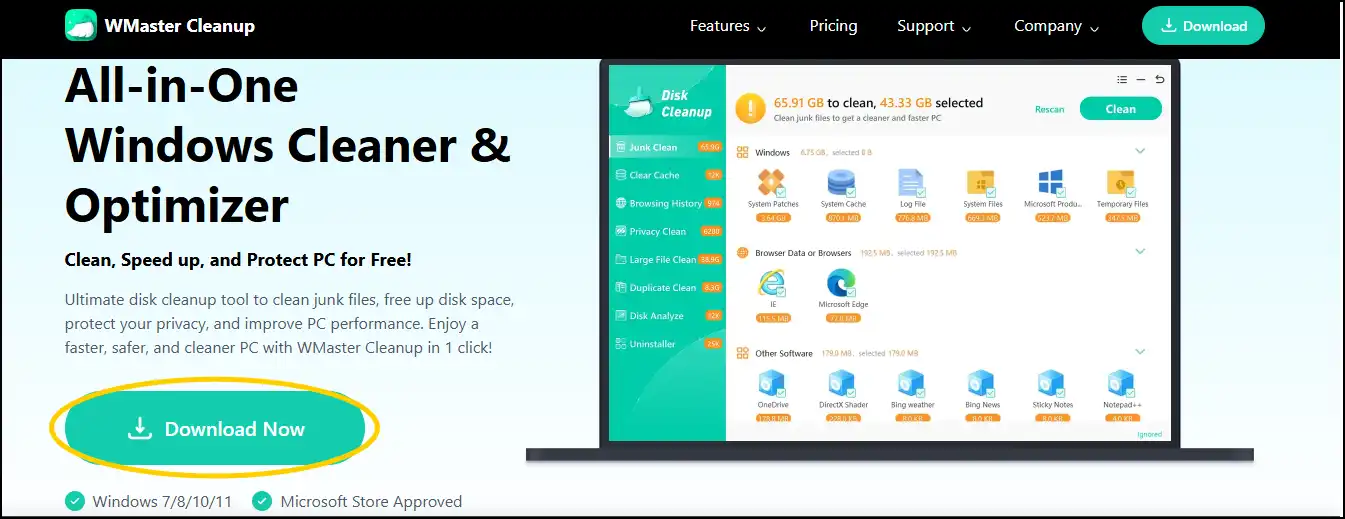
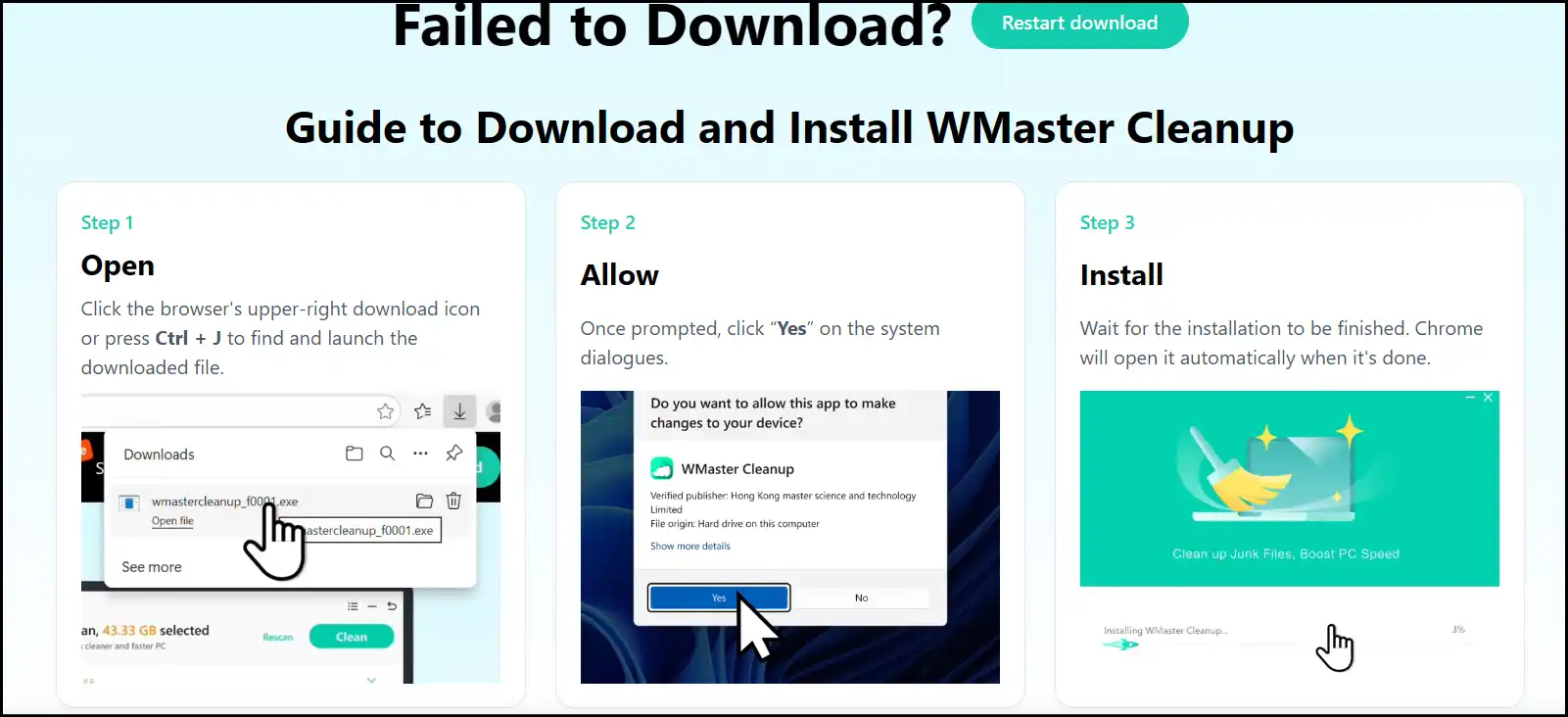
Step 1: Download and Install: Go to the official website of WMaster Cleanup and press "Download Now". Once downloaded, follow the prompt to initiate the installation process.
Step 2: Launch the Software: As soon as the installation completes, hit "Start Now" to launch the app on your desktop. From the main interface, select "Duplicate Clean".
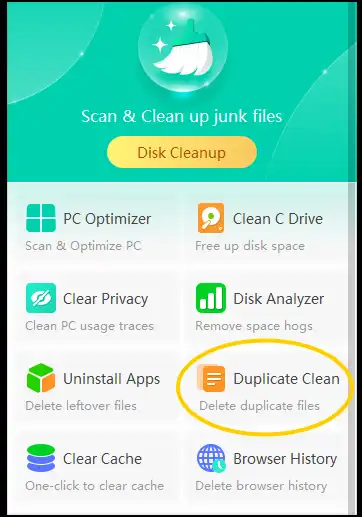
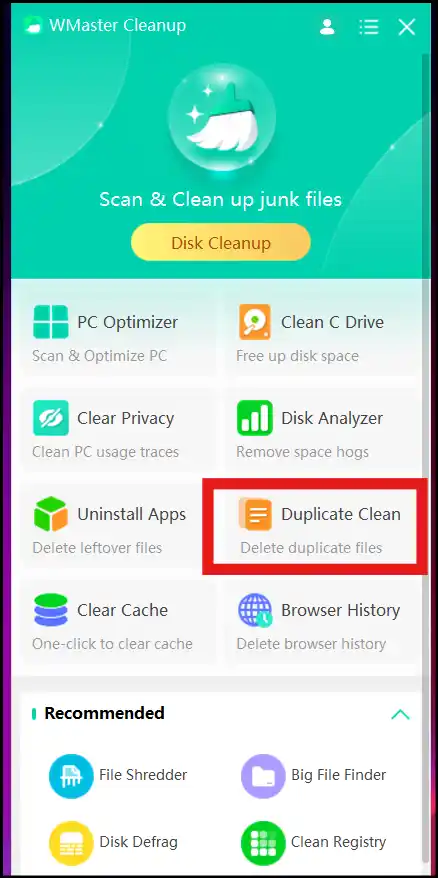
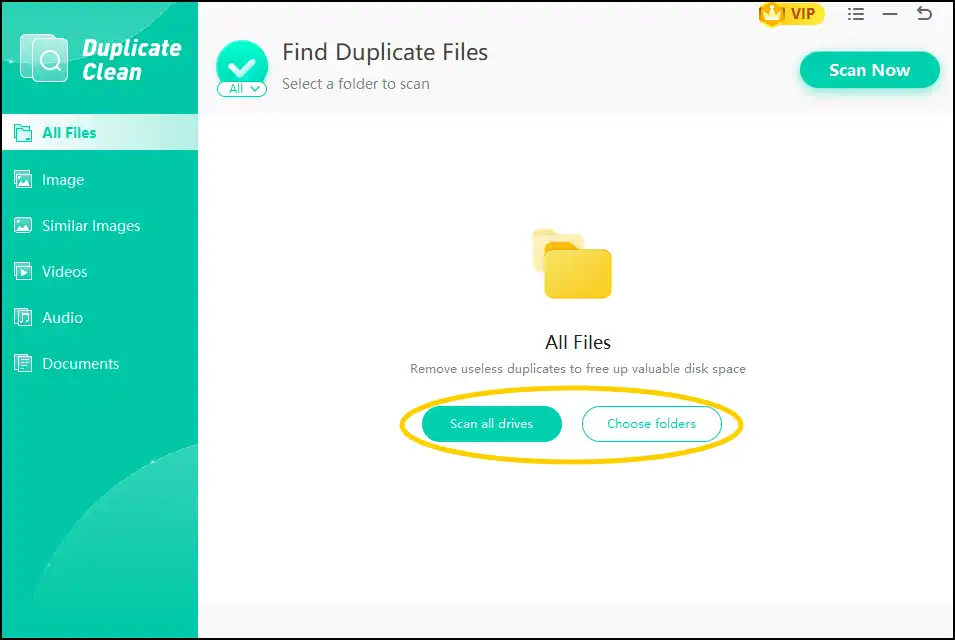
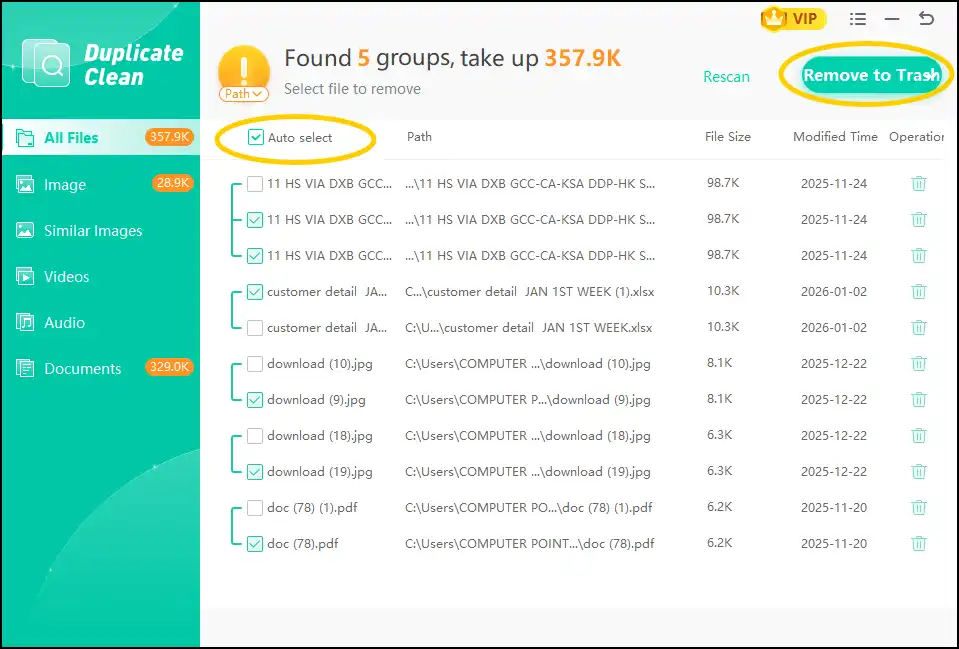
Step 3: Detect and Remove Duplicates: Now select "Scan all drives" or "Choose folders" to quickly scan for duplicates. Once the scan completes, review and select desired duplicates manually or "Auto Select" all the duplicates and then press "Remove to trash".
Tip: If you are scanning all drives, it will include duplicate images, similar images, videos, audio, documents, and zip packages.
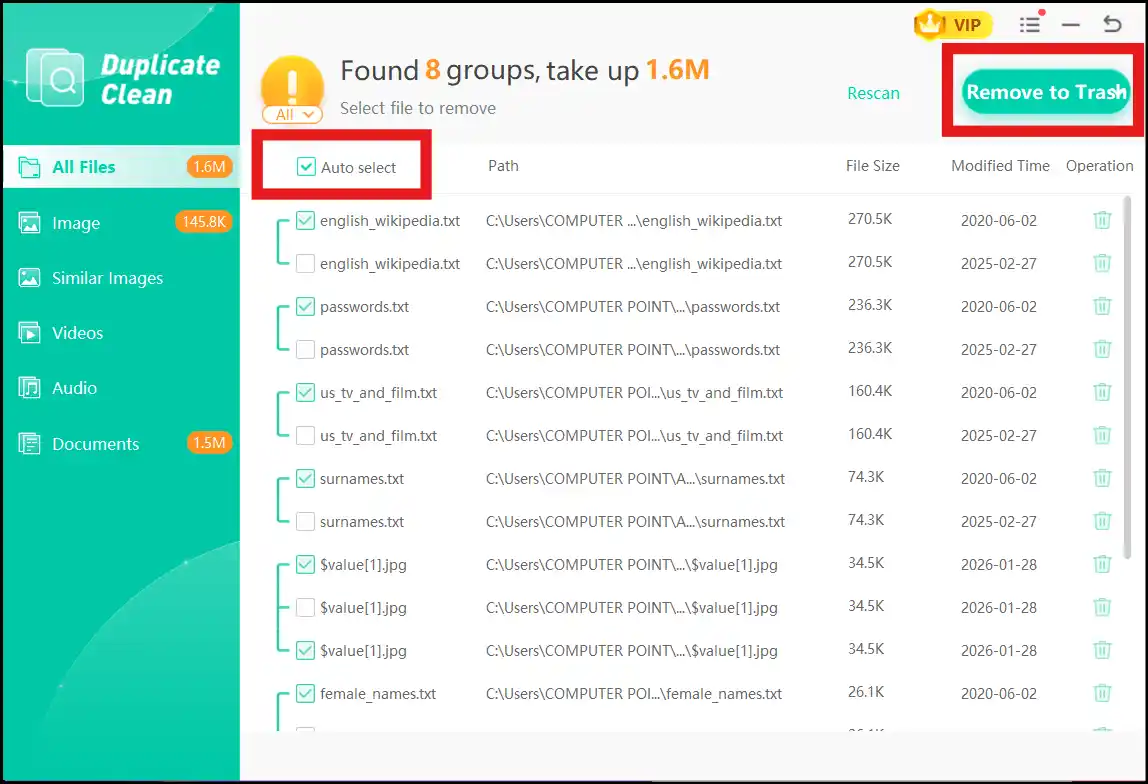
Step 4: Confirm the Deletion: To clean up and speed up your PC performance, click "Confirm" to instantly start the deletion process.
Tip:Deleted duplicates can be restored from the Recycle Bin.
Part 6: Duplicate Cleaner Pro VS WMaster Cleanup
| Features | User Experience | Software Interface | Speed of scanning duplicates | Supports file type | Batch deletion processing | Price |
|---|---|---|---|---|---|---|
| Duplicate Cleaner Pro | Require learning to use the software | Complex | Fast | MP3, OGG, WMA, M4A, M4P (iTunes), AAC, FLAC and WAV | Yes | One-time or subscription-based |
| WMaster Cleanup | Designed for beginners and casual users | Simple | Fast | Images, audio, video, documents, and archives Supports over 40 file formats | Yes | Free (Limited-time offer) |
Part 7: Hot FAQs Related to Duplicate Cleaner Software
Q1. What are the best duplicate file finders for Windows?
For Windows, we recommend Duplicate Cleaner Pro and Ashisoft Duplicate Cleaner for professional-grade users. These paid tools deeply scan your system to detect exact and comparable duplicates and remove them efficiently. On the other hand, WMaster Cleanup is free (for a limited time) and serves as the best alternative to Duplicate Cleaner Pro. Moreover, it has an intuitive interface, works for both pros and non-techies, and has other cleanup features to scan over 40 file formats for a faster and cleaner PC.
Q2. How accurate are duplicate cleaners in finding similar but not identical images?
Tools like Duplicate Cleaner Pro (paid) and WMaster Cleanup (free for a limited time) use advanced algorithms to identify images that are visually the same through content-based analysis, even if their filenames or metadata are different.
Q3. Is duplicate cleaner safe?
Yes, these tools are safe if you download them from trustworthy sources such as WMaster Cleanup. This lightweight tool is completely free for a limited time, beginner-friendly, and can handle common cleanup tasks, including duplicate images, similar images, videos, music, documents, and zip packages, efficiently. Moreover, it can instantly scan over 40 duplicate file formats and remove them in batches from local and external drives with just one click.
Q4. Is it safe to delete duplicate files?
It depends on the tool you are using. If you use reliable tools that offer backup and restoring features, you can get back your deleted files if needed. If you are using WMaster Cleanup, you can restore your deleted files easily from the Recycle Bin.
Q5.Which software is best for finding file duplicates?
WMaster Cleanup is an all-in-one Windows cleaner and optimizer, free for a limited time, that can clean, speed up, and protect your PC. It uses the dual-engine speed-up technology and MD5 Message-Digest Algorithm to deeply scan duplicates on external hard drives, local SSDs and HDDs, and USB flash devices (NTFS file system). So, with just one click, get extra storage space and a cleaner PC by finding and removing all hidden duplicate images, similar images, videos, documents, audio, and zip packages in bulk.
Final Words
To free up your device storage and maintain optimal system performance, knowing which duplicate cleaner to use to manage duplicate files is essential. Serving different user needs, both Duplicate Cleaner and WMaster Cleanup are effective tools. On one hand, Duplicate Cleaner Pro offers in-depth scans and advanced filtering, which are useful for professional users who are handling large and complex media libraries. However, to efficiently use this tool, users need to learn its complex user interface and pay for a subscription.
WMaster Cleanup , on the other hand, offers a user-friendly experience to clean up your PC and boost its performance by efficiently detecting and removing duplicate files. Moreover, WMaster Cleanup also offers other features that are helpful to optimize the overall performance of your system, such as Software Management, Clear Cache, Clear Browsing History, Disk Cleanup, and more.
With a comprehensive range of features and intuitive design, WMaster Cleanup is suitable for everyday PC maintenance and works for both professional and casual users. So, what are you waiting for? Try this amazing tool and make sure that your PC stays clutter-free and runs smoothly—all without any cost.


